FTDX1200 Operating Manual Page 59

TOOLS FOR COMFORTABLE AND EFFECTIVE RECEPTION Cont'd

Previous Page    Index of Topics    Table of Contents    Index of Pages    Next Page

DSP IF FILTER TYPES


Using DSP arithmetic processing and the normal bandwidth characteristics of the DSP IF filter, the sound quality can be made close to a conventional alalog filter by rounding the shoulders of the filter, or importance can be placed on the filter cut-off by making the skirt characteristics flat. In addition, an improved filter compostion can be enjoyed depending on the mode by combining the passing bandwidth characteristics and attenuation band characteristics.

    1. Press the [MENU] button to engage the Menu mode.

    2. Rotate the [VFO-B/CLAR] knob (or press the [▲/▼] button) to select the desired mode. See the tables below for details.

    3. Press the [SELECT] button.

    4. Rotate the [VFO-B/CLAR] knob (or press the [▲/▼] button) to adjust the sound quality.

When the [CLEAR] button is pressed, the values can be returned to their initial values.

    5. When the [SELECT] button is pressed followed by the [MENU] button, the new setting will be confirmed and operation returns to normal.

Passing Bandwidth Characteristics

The following settings are available.

       SHARP: Set the passing bandwidth of the IF filter as amplitude characteristic. Using DSP arithmetaic processing, a sharp and ideal shape factor will result.

       SOFT: Set the characteristic of the IF filter as a phase characteristic. Using DSP arithmetaic processing, the shoulder of the filter will become rounded and the sound quality will become close to that of a conventional filter.

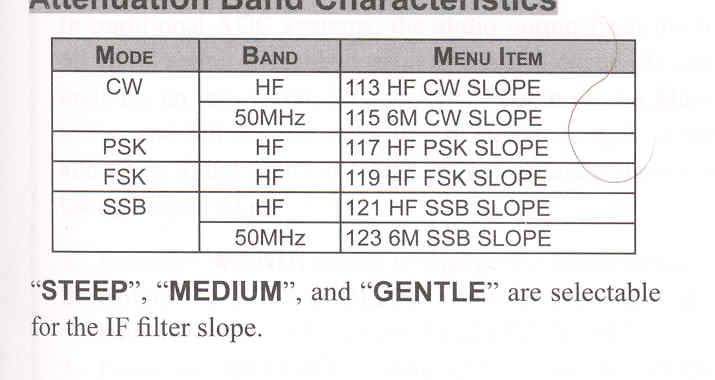
Attenuation Band Characteristics

"STEEP", <"MEDIUM",> and "GENTLE" are selectable for the IF filter shape.


End of "DSP IF Filter Types"

Cont'd Next Page "Tools for Comfortable and Effective Reception"

Previous Page    Index of Topics    Table of Contents    Back to Top    Index of Pages    Next Page

FTDX1200 Operating Manual Page 59